

Artificial intelligence is changing quickly. New AI tools, features, and updates are introduced regularly, making it easier for people to write, create images, analyze information, automate tasks, and improve productivity.
However, keeping up with AI new features can be difficult. A feature that was unavailable a few months ago may now be built into an AI platform, while another tool may have changed its pricing, capabilities, or availability.
The good news is that you do not need to be an AI expert to learn these updates. With the right approach, you can discover new AI features, understand what they do, and use them effectively.
This guide explains how to find new AI features, how to learn them, and how to use AI tools safely and effectively.
What Are AI New Features?
AI new features are new capabilities added to an artificial intelligence tool or platform.
For example, an AI service may introduce features that allow users to:
- Generate or edit images
- Analyze uploaded documents
- Summarize long information
- Create content from instructions
- Work with data
- Improve writing
- Generate code
- Use voice conversations
- Automate repetitive tasks
- Connect AI with other applications
Not every new feature is available to every user immediately. Availability can depend on the AI service, subscription plan, location, device, or rollout schedule.
Best 100% free AI Tools
That is why it is important to check the official documentation or product announcements before assuming that a feature is available to everyone.
Why Should You Learn New AI Features?
Learning new AI features can help you save time and work more efficiently.
Instead of performing a repetitive task manually, you may be able to use an AI tool to assist with part of the process. For example, a blogger can use AI to brainstorm article ideas, create an initial outline, summarize research, or improve the readability of a draft.
AI should not replace your judgment. Instead, it can act as a productivity assistant.
The most useful AI features are usually the ones that solve a specific problem.
For example:
Problem: You spend too much time creating article outlines.
Possible AI solution: Use an AI writing assistant to create an initial outline that you review and improve.
Problem: You have a long document to understand.
Possible AI solution: Use a document-analysis feature to summarize key points and identify important sections.
How to Find New AI Features

One of the easiest ways to discover new AI features is to follow the official sources provided by the AI company.
Look for:
1. Official Product Announcements
You can also check official AI product information before using a new feature.
AI companies often announce major updates through their official websites, blogs, release notes, or product pages.Best 100% free AI Tools
Official sources are generally better than relying only on social media posts because they provide more accurate information about what a feature actually does.
2. Release Notes
Release notes can be particularly useful for people who want to track product changes.
They may explain:
- New features
- Improvements
- Bug fixes
- Changes to existing tools
- Availability information
- Supported platforms
When researching an AI feature for your blog, check the most recent official information available.
3. Official Documentation
Documentation explains how a feature works and what limitations may apply.
This is especially important for developers, business owners, and advanced users.
If an AI feature involves an API, automation, or technical setup, always check the current documentation before publishing instructions.
4. Product Demonstrations
Video demonstrations can help you understand how a feature works in practice.
However, remember that videos can become outdated quickly. An older demonstration may show an interface or feature that has since changed.
Use videos for learning, but verify important information using current official sources.
How to Learn a New AI Feature
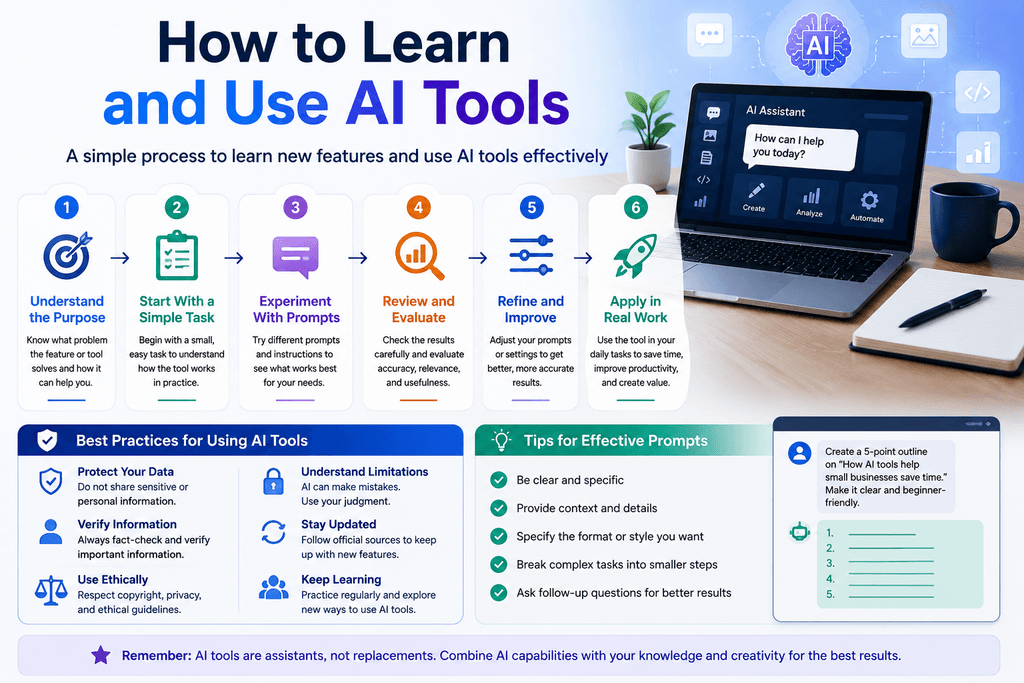
Finding a new feature is only the first step. You also need to learn how to use it effectively.
A simple learning process can make this easier.Best 100% free AI Tools
Step 1: Understand the Purpose
Before using a feature, ask:
What problem does this feature solve?
Do not use an AI feature simply because it is new.
Understand its purpose first.
Step 2: Start With a Simple Task
Avoid testing a new feature with a complicated project.
Start with something small.
For example, if you are learning an AI writing feature, ask it to create a short outline rather than immediately giving it a large business project.
This helps you understand how the feature responds to instructions.
Step 3: Experiment With Prompts
The quality of an AI response can depend on the instructions you provide.
Instead of writing:
Write about AI.
Try providing more context:
Create a beginner-friendly outline explaining how small businesses can use AI to save time. Use simple American English and include practical examples.
Specific instructions usually make it easier to get a useful result.
Step 4: Check the Output
Never assume that an AI-generated answer is automatically correct.
Review important information, especially:
- Statistics
- Dates
- Prices
- Product specifications
- Legal information
- Financial information
- Medical information
- Technical instructions
AI can make mistakes, so human review remains important.
How Bloggers Can Use New AI Features
AI new features can be especially useful for bloggers.
A blogger can use AI during different stages of the content creation process.
Topic Research
AI can help generate possible topics based on a broad subject.
For example, instead of simply writing about “AI tools,” you could explore topics such as:
- AI tools for small businesses
- AI productivity tools for freelancers
- Beginner-friendly AI tools
- AI tools for content creators
- Ways to use AI for everyday tasks
You should still research search demand and competition before choosing a topic.
Content Outlines
AI can help organize an article into logical sections.
A useful outline may include:
- Introduction
- Explanation of the topic
- Main features
- Practical examples
- Advantages and limitations
- Step-by-step guide
- Frequently asked questions
- Conclusion
The writer should review and customize the outline before creating the final article.
Editing and Readability
AI can help identify unclear sentences, repetitive wording, or difficult passages.
However, editing should preserve your own meaning and factual accuracy.
SEO Preparation
AI can help brainstorm:
- SEO titles
- Meta descriptions
- Related keywords
- FAQ questions
- Heading ideas
- Internal linking opportunities
SEO suggestions should support useful content rather than replacing genuine research and reader value.
How to Write About AI New Features
If you are writing an article about a new AI feature, avoid simply repeating an announcement.
Instead, explain what the feature means for ordinary users.
A useful structure is:
What is the feature?
Explain it in simple language.
What can it do?
List practical capabilities.
How does it work?
Provide a simple explanation or setup process when reliable information is available.
Who can benefit from it?
Explain whether it is useful for students, creators, freelancers, businesses, developers, or other users.
What are its limitations?
Mention important restrictions or availability requirements.
Is it free?
Only state pricing information after checking the current official source.
This approach can make your article more useful than a simple news-style announcement.
Common Mistakes to Avoid With AI Features
There are several mistakes bloggers and AI users should avoid.
Publishing Unverified Information
AI products change quickly. Do not publish outdated feature information without checking the current source.
Making Guaranteed Claims
Avoid statements such as “this AI will always produce perfect results.”
AI tools can produce incorrect or incomplete results.
Copying AI Output Without Editing
AI-generated text should be reviewed, fact-checked, and improved before publication.
Your article should provide genuine value to readers.
Ignoring Limitations
Every AI tool has limitations. A trustworthy article should explain important limitations rather than presenting the technology as perfect.
Using Outdated Screenshots
AI interfaces can change. If you use screenshots in your article, make sure they accurately represent the current product experience.
AI Features and Online Safety
AI tools can be useful, but users should think carefully about what information they provide.
Avoid entering sensitive personal information, passwords, confidential business documents, or other private information unless you understand the service’s privacy and data-handling policies.
Before using an AI service for professional work, review its current terms and privacy information.
For business use, organizations should also establish clear rules for how employees can use AI tools.
How to Stay Updated on AI
Because AI changes so quickly, learning should be an ongoing process.
You can create a simple routine:
Weekly: Check important AI product announcements.
Monthly: Test useful new features.
When needed: Read official documentation before using advanced features.
Before publishing: Verify important facts, pricing, availability, and feature descriptions.
You can also maintain a personal list of AI tools that you use regularly. Record the tool name, its main purpose, useful features, and the date you last verified the information.
This can make it easier to keep your blog content accurate.
Frequently Asked Questions
What are AI new features?
AI new features are new capabilities or improvements introduced by an artificial intelligence product or platform. They can include new ways to generate content, analyze information, automate tasks, or interact with AI.
How can I learn new AI features?
Start with the official product documentation or announcements. Then test the feature with a simple task and gradually move to more advanced use cases. AI free
Can AI features help bloggers?
Yes. AI can assist with brainstorming, outlining, editing, research organization, and other parts of the blogging workflow. However, bloggers should review AI-generated information and maintain human oversight.
Are all AI features free?
No. Some AI features may be free, while others may require a paid plan or may have usage limits. Availability can also change over time, so check the current official information for the specific product.
Should I trust everything generated by AI?
No. AI-generated information should be reviewed, especially when it involves important facts, statistics, financial decisions, legal matters, medical information, or other high-stakes topics.
Final Thoughts
AI is developing quickly, and new features can create useful opportunities for individuals, bloggers, freelancers, and businesses.
The best way to approach AI new features is not to chase every update. Instead, focus on features that solve real problems and improve your workflow.
Start with simple experiments, learn from official documentation, write clear instructions, and verify important information before relying on AI-generated results.
For bloggers, the same principle applies to publishing. A successful AI article should not simply describe a new feature. It should explain what the feature does, who can use it, how it can help, and what limitations readers should understand.
By combining AI tools with human judgment, research, editing, and fact-checking, you can create more useful content while keeping your readers’ trust.